Transfer Operators
Ce contenu n’est pas encore disponible dans votre langue.
Transfer Operator Partners are external companies (e.g. other operators or subcontracted fleets) that can be assigned to transfer bookings. They receive assignment notifications and can accept or decline.
Enabling a partner as Transfer Operator
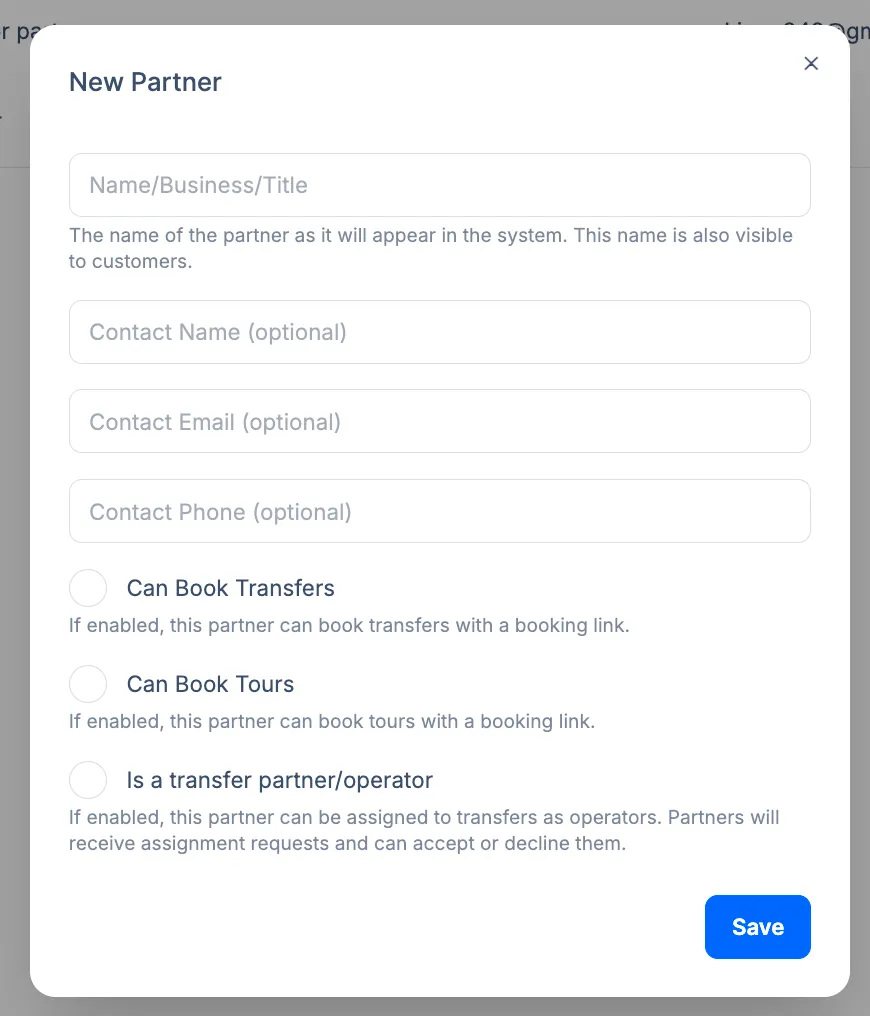
Section titled “Enabling a partner as Transfer Operator”In Partners, click New Partner (or open an existing partner). In the form, enter the partner name/business/title and contact information (name, email, phone), then enable Is a transfer partner/operator. The description in the UI: “If enabled, this partner can be assigned to transfers as operators. Partners will receive assignment requests and can accept or decline them.” Click Save.
That partner then appears in the operator assignment dropdown on Booking Details. When you assign them to a booking, they receive the assignment (e.g. by email) and can confirm or decline.
Difference from internal drivers
Section titled “Difference from internal drivers”- Internal drivers – Added under Team > Drivers; they log in to the driver app and see their assignments.
- Transfer Operator Partners – External companies; assignment and acceptance workflow is used instead of (or in addition to) the driver app.
Related pages
Section titled “Related pages”- Partners Overview
- Booking Partners - Partners who book with commission
- Assigning Operators - How to assign a driver or partner to a booking