Availability Zones
Ce contenu n’est pas encore disponible dans votre langue.
Availability Zones define where pick-ups and drop-offs are available. They are different from Catalog > Areas, which are used for pricing. Availability Zones control which pickup and drop-off locations customers can choose on the booking form.
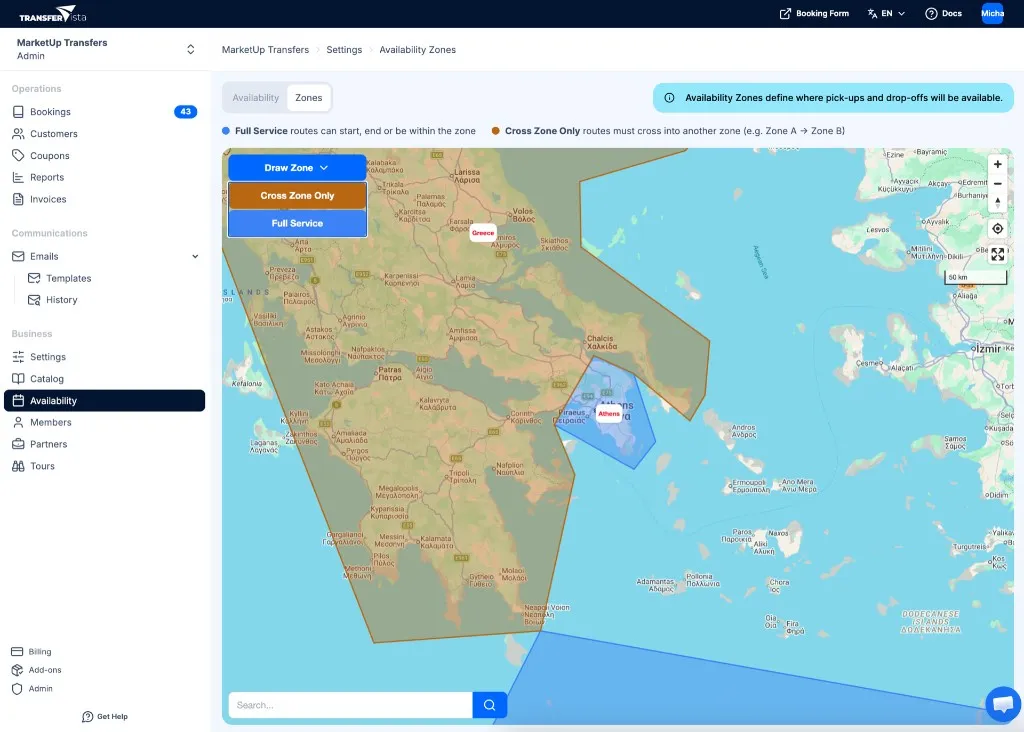
Go to Business > Availability in the sidebar and open the Zones tab.
Zone types
Section titled “Zone types”- Full Service – Routes can start, end, or be entirely within the zone (e.g. hotel-to-hotel within a city).
- Cross Zone Only – The route must cross into another zone (e.g. Zone A to Zone B); both pickup and drop-off cannot be in the same zone (e.g. airport zone where transfers must go to or from another area).
Creating and editing zones
Section titled “Creating and editing zones”On the Zones tab you can create and manage multiple zones using the interactive map:
- Use Draw Zone to draw zone boundaries on the map (polygon), then choose Full Service or Cross Zone Only
- Name each zone and set its type
- Edit zone boundaries, names, or types, and delete zones as your service area changes
If a customer selects a location outside your zones, they will see that the service is not available for that request (location validation; the booking form blocks invalid pickup/drop-off choices).
Related pages
Section titled “Related pages”- Availability Overview
- Rules & Scheduling - When bookings are allowed
- Areas - Pricing zones (different from availability zones)