
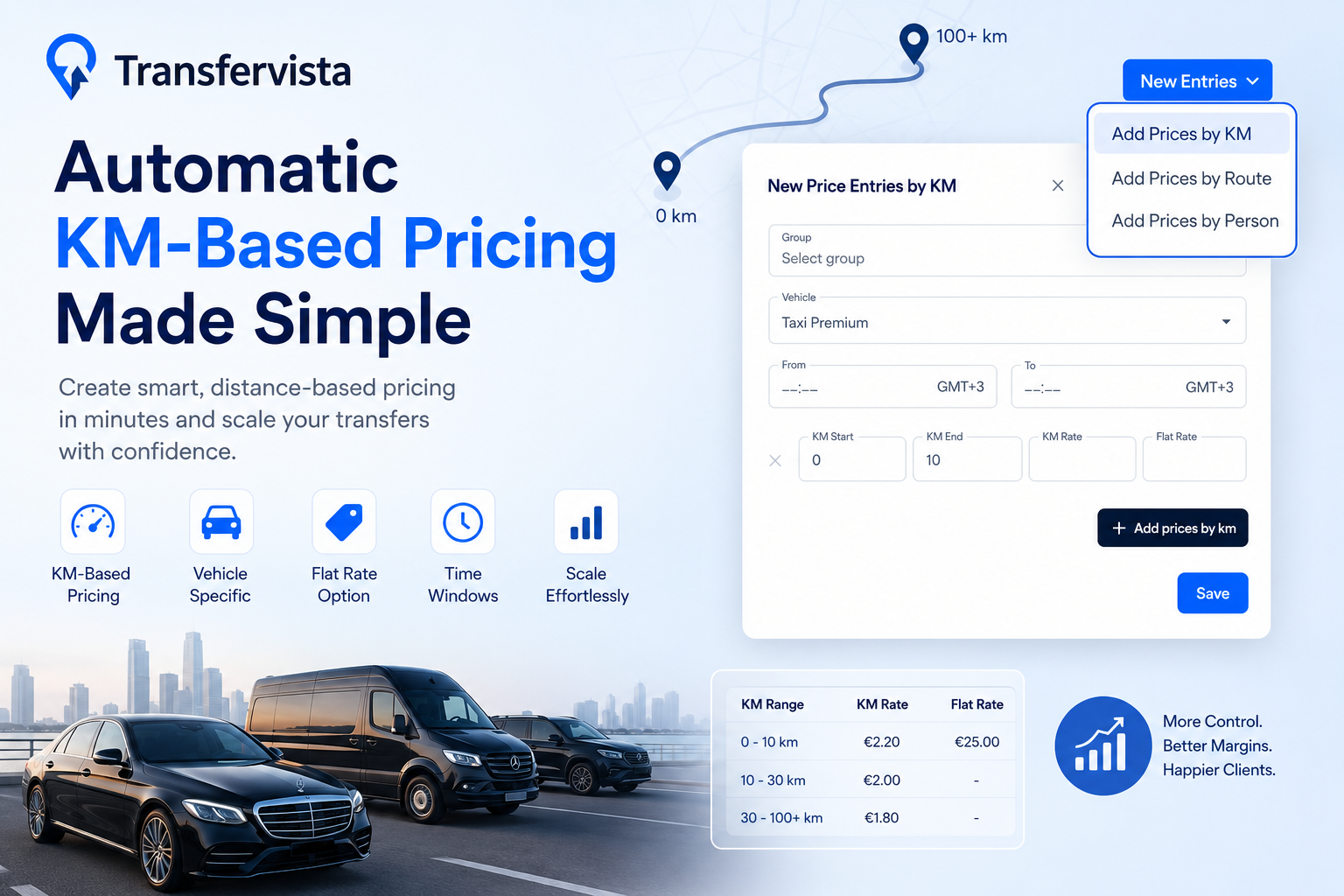

For transfer companies, chauffeur services, taxi operators, and mobility providers, pricing consistency matters. Manually maintaining rates for every distance range quickly becomes difficult as your service catalog grows. That’s where an automatic kilometer-based pricing widget becomes valuable.
With Transfervista, you can create and manage distance-based pricing directly inside your pricing workflow—without manual calculations or external spreadsheets.
Whether you charge customers by distance, apply flat rates for certain ranges, or create vehicle-specific pricing rules, Transfervista supports automatic KM-based pricing configuration designed specifically for transfer operations.
What Is a KM-Based Pricing Widget?
A kilometer-based pricing widget allows operators to define pricing rules according to travel distance.
Instead of entering a separate price for every route, you define:
- Distance ranges (for example: 0–10 km, 10–25 km, 25–50 km)
- Price per kilometer
- Optional flat pricing
- Vehicle-specific configurations
- Time-based availability windows
Once configured, pricing becomes structured and easier to maintain across your catalog.
This is especially useful for:
- Airport transfer companies
- Chauffeur services
- Taxi fleets
- Executive transportation providers
- Mobility marketplaces
- Multi-vehicle operators
How Transfervista Supports Automatic KM-Based Pricing
Transfervista includes a built-in Add Prices by KM feature inside the pricing management area.
Using this tool, operators can:
- Create kilometer-based pricing entries
- Configure pricing per vehicle category
- Set distance brackets using KM Start and KM End
- Define per-KM rates
- Add optional flat rates
- Control pricing availability by time windows
- Scale pricing without creating hundreds of manual routes
This approach gives teams more flexibility while keeping pricing centralized and easier to update.
For example:
| KM Range | KM Rate | Flat Rate |
|---|---|---|
| 0–10 km | Fixed pricing | Optional |
| 10–30 km | Distance pricing | Optional |
| 30–100 km | Dynamic pricing | Optional |
Because pricing rules live inside your catalog, updates become faster and operational errors are reduced.
How to Configure KM-Based Pricing in Transfervista
Getting started takes only a few steps.
1. Register
Create your Transfervista account and complete onboarding.
2. Go to Catalog
After logging into your dashboard, open the Catalog section.
3. Open Price List
Inside Catalog, navigate to Price List to manage your pricing structure.
4. Click New Entries → Add Prices by KM
In the top-right corner:
New Entries → Add Prices by KM
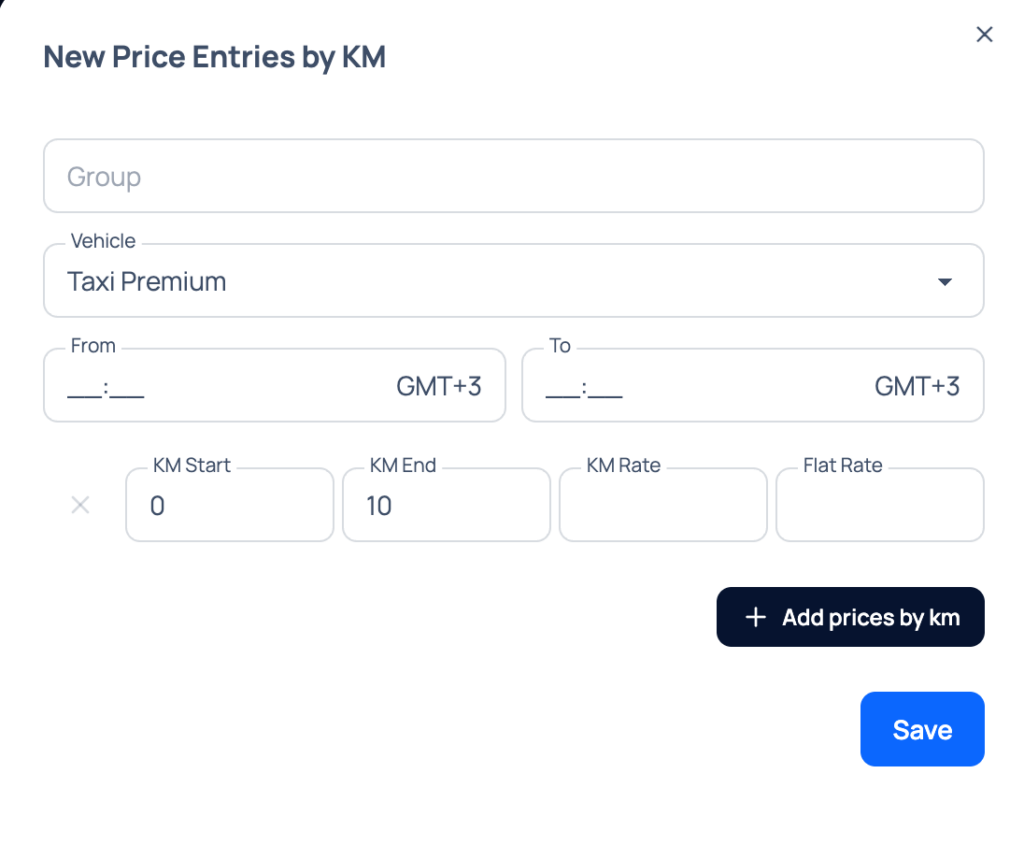
This opens the pricing configuration window.
Inside the form you can:
- Select a vehicle group
- Choose the vehicle type
- Define availability times
- Enter KM Start
- Enter KM End
- Configure KM Rate
- Add an optional Flat Rate
- Save and activate the pricing entry
You can continue adding multiple ranges using Add prices by km to build a complete pricing structure.
Why Operators Choose KM-Based Pricing
Distance pricing creates a better balance between automation and control.
Benefits include:
Faster Setup
Create pricing logic once instead of managing hundreds of routes.
Better Margin Control
Charge appropriately across short and long journeys.
Easier Scaling
Add new vehicles and services without rebuilding pricing.
Cleaner Operations
Keep pricing organized inside one centralized catalog.
Flexible Business Models
Combine distance rates with fixed pricing when needed.
Demo buchen
If you’d like to see how automatic kilometer-based pricing works in a live environment, schedule a demo with the Transfervista team.
👉 Vereinbaren Sie eine Demo mit Transfervista
See how to configure pricing rules, optimize your catalog, and automate pricing workflows for your transfer business.
How do I set up automatic KM-based pricing in Transfervista (for example: 4€ base fare + 2.40€/km)?
Transfervista supports automatic kilometer-based pricing directly inside the Price List section.
To configure pricing:
Register and log in to your Transfervista account
Gehe zu Catalog
Open Price List
Click New Entries → Add Prices by KM
Select the vehicle category
Define the KM range (for example, 0–999 km)
Enter your pricing logic:Flat Rate: €4.00 (base fare)
KM Rate: €2.40 per kilometer
Save the pricing rule
Once active, the system automatically calculates pricing based on travel distance according to your configured rate structure.
How do I embed the Transfervista booking widget into my website?
Transfervista allows operators to embed the booking widget directly into their website.
Typical setup includes:
1) Access your Transfervista dashboard
2) Open the booking widget or integration settings
3) Generate your embed code
4) Copy the provided script or iframe snippet
5) Paste it into your website where you want the booking form to appear
The embedded widget allows customers to search, calculate prices, and submit bookings without leaving your website.
If you need assistance with implementation, the Transfervista team can guide you through setup and best practices. Please contact info@transfervista.com
Can the Transfervista booking widget be displayed in German?
Yes. Transfervista supports multilingual experiences, including German.
You can configure the booking widget to display in German so customers see the booking flow in their preferred language. This helps improve usability and creates a more localized booking experience for German-speaking markets.
If you operate in multiple countries, additional language configurations may also be available depending on your setup.
Need help configuring language settings or pricing rules? Book a demo with the Transfervista team through the contact page.