


In today’s fast-paced digital world, customers expect seamless online services. If you run a taxi or transportation business, offering an easy-to-use online booking system can significantly boost your sales and customer satisfaction. For Wix users, integrating a taxi booking form might seem challenging—but with Transfervista, it’s simpler than ever.
In this post, we’ll explore how to add a Wix taxi booking form, why Transfervista is the best solution, and tips for optimizing your booking system for conversions.
Why You Need a Taxi Booking Form on Your Wix Website
Online booking forms have become essential for service-based businesses. Here’s why:
- Convenience for Customers: Your clients can book rides anytime, eliminating the need for phone calls.
- Streamlined Operations: Reduce administrative tasks and human error by automating bookings.
- Improved Customer Retention: A simple, professional booking experience encourages repeat business.
- Better Insights: Track bookings, popular routes, and peak hours for smarter business decisions.
For Wix users, this means your website can become a fully functional reservation platform without heavy coding.
Introducing Transfervista: The Best Wix Taxi Booking Solution
Transfervista is a versatile online booking system designed for transportation businesses. It integrates seamlessly with Wix, enabling you to add a fully functional taxi booking form in minutes.
Key Features of Transfervista for Wix:
- Customizable Booking Forms: Tailor fields for passenger details, pickup/drop-off locations, vehicle type, and more.
- Real-Time Availability: Display available taxis dynamically to avoid double bookings.
- Payment Integration: Accept online payments through Stripe, PayPal, and other gateways.
- Automated Notifications: Email or SMS confirmations for clients and drivers.
- Multi-Language & Currency Support: Perfect for international travelers.
- Analytics & Reports: Track bookings, revenue, and customer behavior directly from your dashboard.
With Transfervista, Wix users can transform their website into a professional taxi booking portal without relying on third-party developers or complex plugins.
Step-by-Step Guide to Adding a Wix Taxi Booking Form Using Transfervista
Here’s how you can add a taxi booking form to your Wix website:
Step 1: Sign Up for Transfervista
- Visit the Transfervista website and create an account.
- Choose the plan that fits your business size and needs.
Step 2: Create Your Booking Form
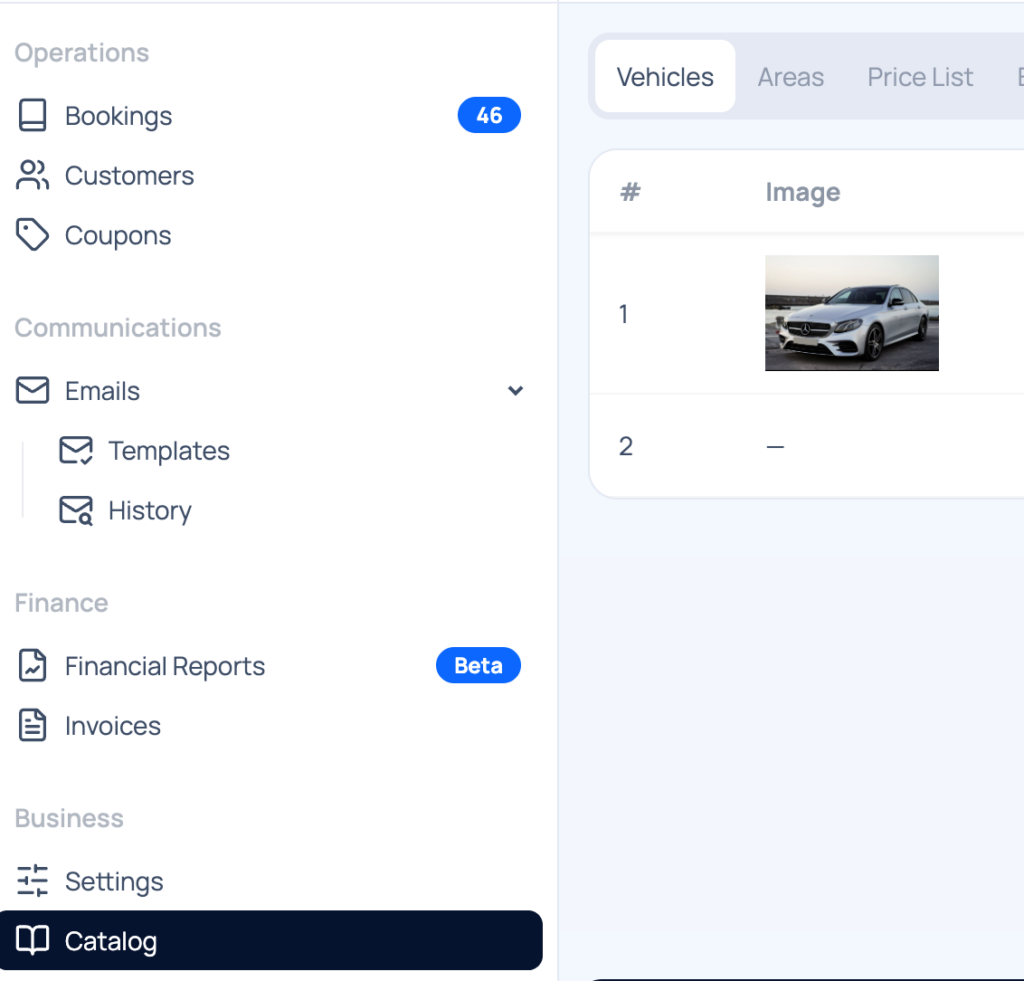
- Go to Catalog to start! Provide
- Vehicle preferences (sedan, SUV, van, etc.)
- Areas that your service works. Find more details in our areas documentation
- Pricing list (you can create prices per kilometer or fixed prices by route)
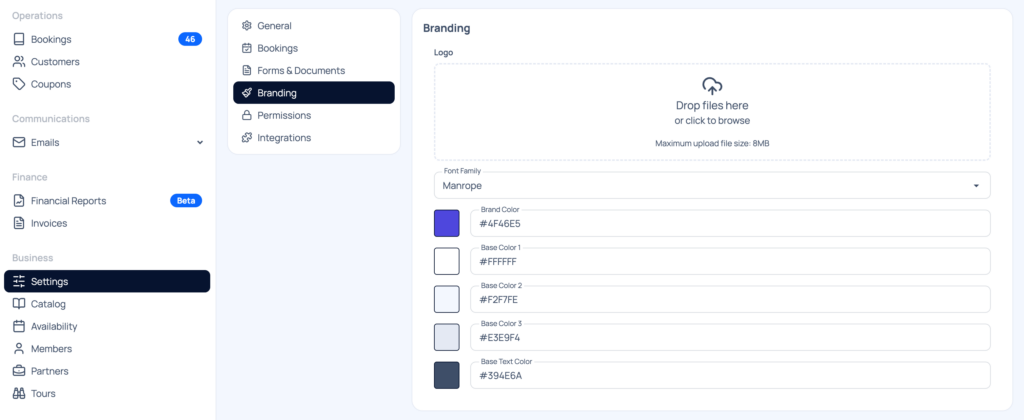
Customize the form’s look to match your Wix website’s design.
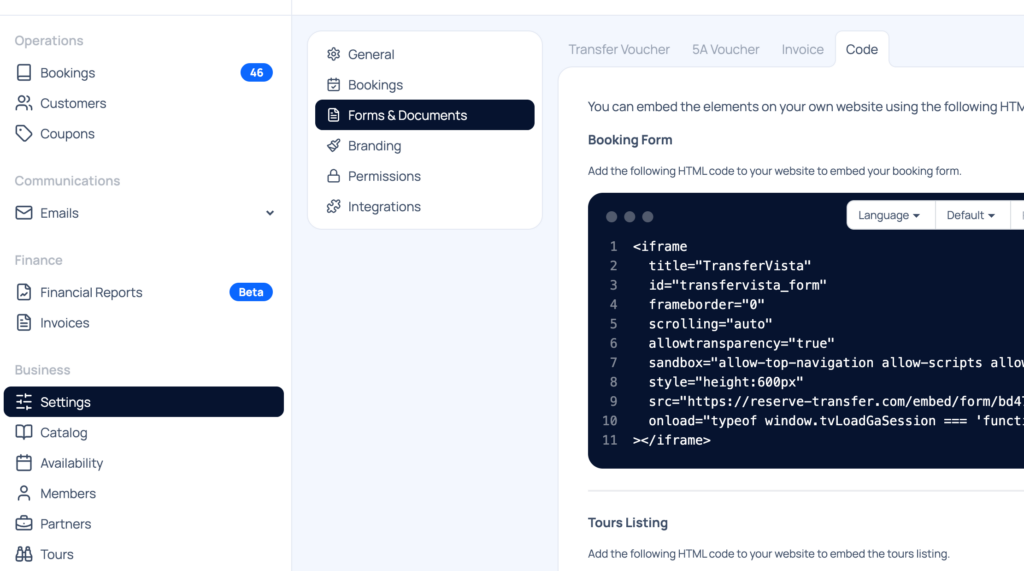
Step 3: Generate the Wix Embed Code
- Transfervista provides a simple HTML embed code for your booking form.
- Go to settings > forms and Documents and then click to Code (check the image below)
Step 4: Embed the Form on Wix
- Go to your Wix website editor.
- Add an HTML iframe element to the page where you want the booking form.
- Paste the Transfervista code.
- Resize and style the iframe to fit your site’s layout.
Step 5: Test Your Booking Form
- Check the form on desktop and mobile devices.
- Make a test booking to ensure notifications and payment processing work correctly.
Step 6: Go Live
- Publish your Wix site and promote your online booking system through social media, email newsletters, or Google Ads.
Why Transfervista Outperforms Other Wix Taxi Booking Plugins
Many Wix users struggle with booking apps that are either too basic or overly complex. Here’s why Transfervista stands out:
| Feature | Transfervista | Standard Wix Booking Plugins |
|---|---|---|
| Real-Time Availability | ✅ | ❌ |
| Online Payments | ✅ | Limited |
| Custom Fields | ✅ | Limited customization |
| SMS/Whatsapp Notifications | ✅ | Usually email-only |
| Multi-Language | ✅ | Rarely supported |
| Analytics & Reports | ✅ | Basic or unavailable |
Transfervista combines simplicity, power, and flexibility, making it the ultimate solution for Wix-based taxi businesses.
Frequently Asked Questions (FAQs)
Can I integrate Transfervista with Wix without coding skills?
Yes! Transfervista provides an easy HTML embed code, so you don’t need any technical expertise.
Is Transfervista suitable for multiple taxis and drivers?
Absolutely. The platform can manage multiple vehicles, drivers, and bookings simultaneously.
How can I add a taxi booking plugin on my WIX website?
You can use Transfervista. The setup takes 5 minutes and you can book a free demo with the transfervista support team to help you
Can I accept payments directly through the booking form?
Yes. Transfervista supports Stripe, PayPal, and other popular payment gateways.
How can I customize the form’s appearance on Wix?
You can match colors, fonts, and layout in Transfervista before embedding it, ensuring it fits your Wix site perfectly.
Does it support international bookings?
Yes. The system supports multiple languages and currencies.
Conclusion: Transform Your Wix Website into a Taxi Booking Hub
Adding a Wix taxi booking form has never been easier. With Transfervista, you get a professional, customizable, and user-friendly system that improves customer experience, reduces manual work, and increases revenue.
Whether you’re running a local taxi service, airport shuttle, or chauffeur business, Transfervista provides the tools to make online booking seamless.
Start today and watch your bookings soar!