Forms & Documents
To access Forms & Documents settings, go to Settings in the sidebar and select Forms & Documents. This page has three tabs: Transfer Voucher, Invoice, and Code for embedding widgets on your website.
Transfer Voucher
Section titled “Transfer Voucher”Transfer vouchers are documents that can be printed or shared with drivers, containing all the details of a booking.
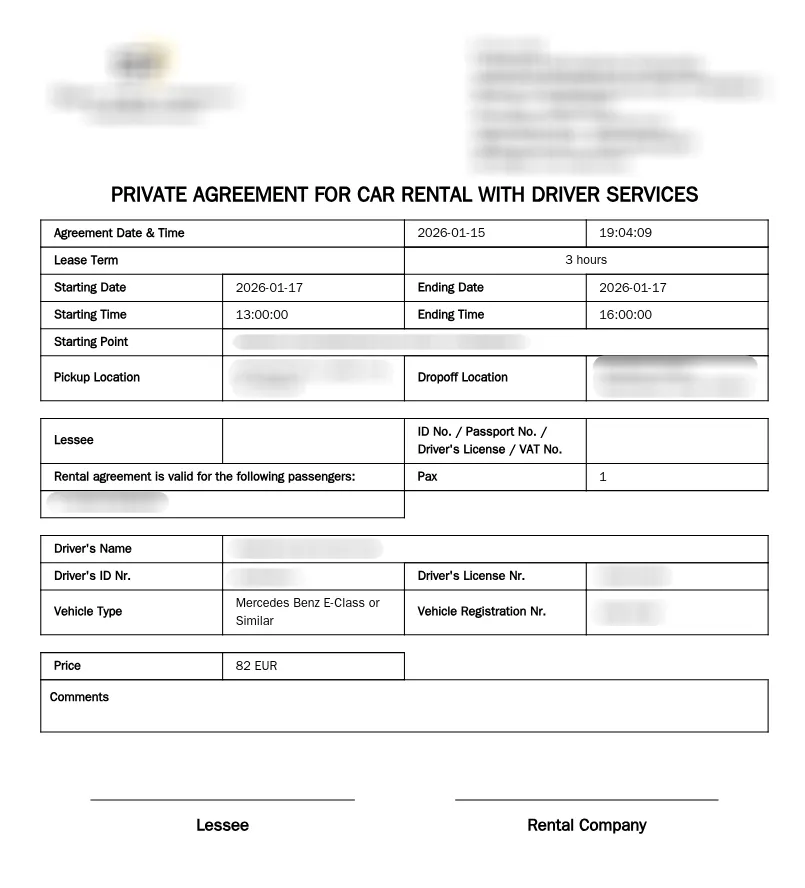
Generating a Voucher
Section titled “Generating a Voucher”To generate a voucher for a booking, go to Bookings, open the booking details page, and click the Voucher button. The voucher will be generated using the settings configured on this page.
Reference
Section titled “Reference”| Field | Description |
|---|---|
| Show Payment Method | When enabled, the voucher displays how the customer will pay. |
| Show Booking Price | When enabled, the voucher displays the total price of the transfer. |
| Starting Point | The headquarters or base location of your transfer company. This can be overwritten when generating vouchers. |
| Minimum Lease Duration | The shortest time a transfer can be leased for, in minutes. |
| Business Information | Text that appears at the top of the voucher. Use this to display your company name, address, registration number, contact details, or any other relevant business information. |
| Agreement Terms Text (English) | The terms and conditions text in English that appears on the voucher. This typically covers liability, cancellation policies, and service terms. |
| Agreement Terms Text (Localized) | The same agreement terms translated into your local language. This version is shown alongside or instead of the English version based on customer preference. |
| Consent Text (English) | A consent statement in English that customers agree to when signing the voucher. This might include data processing consent or acknowledgment of terms. |
| Consent Text (Localized) | The consent text translated into your local language. |
| Signature Image | Your company’s signature or stamp image that appears on vouchers. Drag and drop an image file or click to browse. Maximum file size: 8MB. |
Invoice
Section titled “Invoice”Invoices are formal billing documents that can be generated for bookings.
Invoice Settings
Section titled “Invoice Settings”| Field | Description |
|---|---|
| Business Information | Text that appears at the top of the invoice. Include your company name, address, tax ID, registration number, and any other legally required business details. |
Signature Image
Section titled “Signature Image”Upload a signature image to appear on invoices.
- Recommended dimensions: 300 x 100 pixels
- Maximum upload file size: 8MB
Code (Embedding)
Section titled “Code (Embedding)”The Code tab provides HTML snippets for embedding TransferVista widgets on your own website.