Booking Partners
Dieser Inhalt ist noch nicht in deiner Sprache verfügbar.
Booking Partners are external businesses (e.g. hotels, travel agents) that send you bookings via a dedicated link. You can add a commission on top of your prices so the partner earns a share.
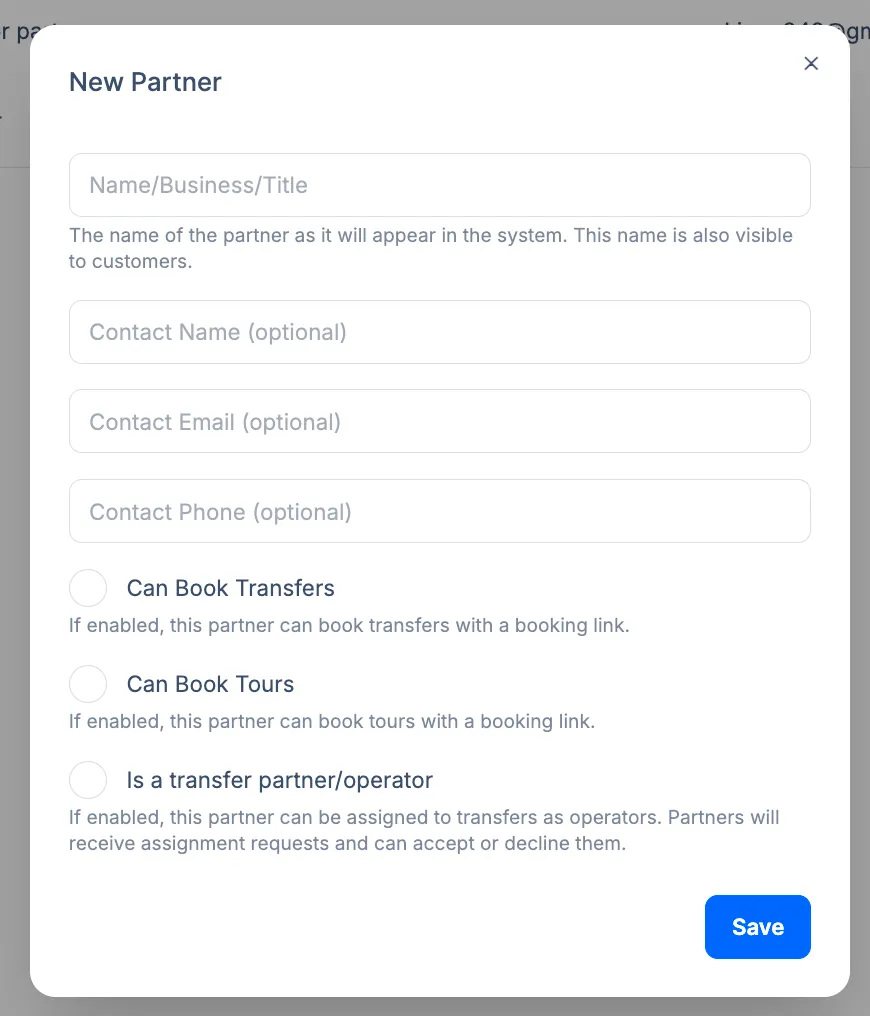
New Partner form
Section titled “New Partner form”Click New Partner on the Partners list. The form includes:
- Name/Business/Title – The name of the partner as it appears in the system and to customers.
- Contact Name, Contact Email, Contact Phone (optional) – Primary contact for the partner.
Then choose what the partner can do:
- Can Book Transfers – If enabled, this partner can book transfers with a booking link.
- Can Book Tours – If enabled, this partner can book tours with a booking link.
- Is a transfer partner/operator – If enabled, this partner can be assigned to transfers as operators; they receive assignment requests and can accept or decline. See Transfer Operators.
Click Save to create the partner.
Creating a Booking Partner
Section titled “Creating a Booking Partner”For a booking-only partner, add a partner and enable Can Book Transfers (and optionally Can Book Tours if you use the Tours add-on). Each partner gets:
- A unique booking URL they share with their customers
- Optional address restrictions (which pickup/drop-off addresses they can use)
- Commission rates (e.g. by price list group or percentage)
Commission is added to the total (e.g. 10% on €100 = €110 charged to the customer).
Partner users
Section titled “Partner users”You can invite users to the partner’s dashboard so they can create and view bookings for that partner. User status (e.g. Invited, Active) can be managed from the partner’s page.
Related pages
Section titled “Related pages”- Partners Overview
- Transfer Operators - Partners who fulfill transfers