Driver Experience Overview
Dieser Inhalt ist noch nicht in deiner Sprache verfügbar.
The Driver Experience section of the docs describes how drivers (operators) use TransferVista. Drivers log in with their own account to view assignments and update booking status—no need to use the full admin panel.
What drivers see when they log in
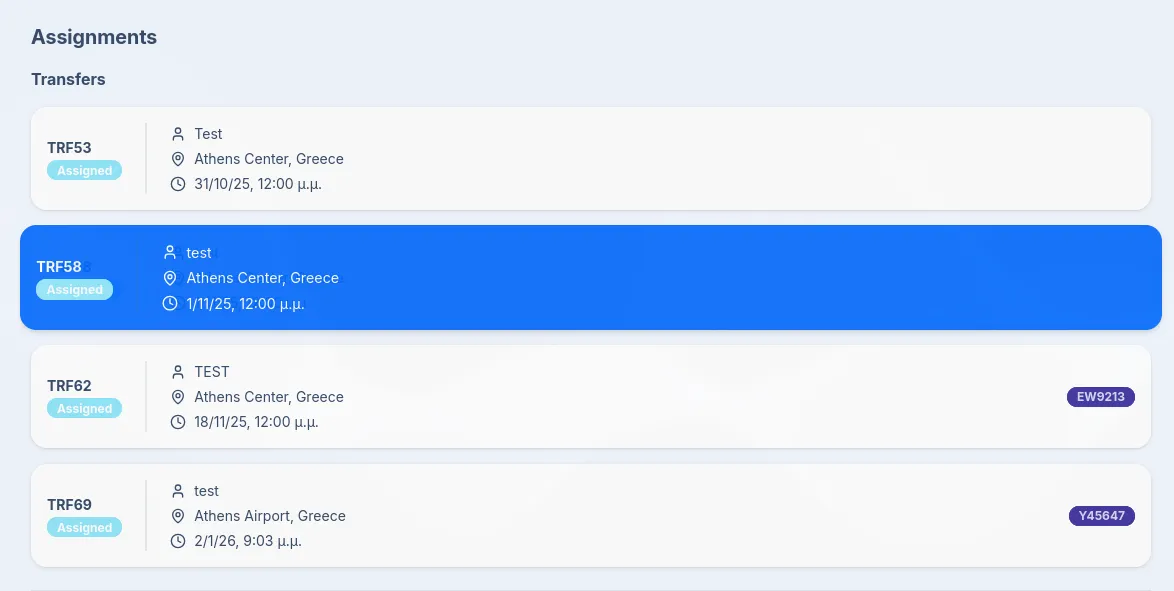
Section titled “What drivers see when they log in”After logging in, drivers land on the Dashboard with an Assignments section. The dashboard shows:
- Transfers – Current and upcoming transfers assigned to them. Each line shows the booking reference, status (e.g. Assigned), customer name, pickup location, and pickup date and time (and flight number when provided).
- Tours – Current tour assignments, if any, with period stats.
- Previous Assignments – Completed transfers for reference.
Drivers can tap or click an assignment to open the full transfer details, then update status to Picked up when they collect the customer and Completed when the journey ends.
Driver permissions
Section titled “Driver permissions”What drivers can see and do is controlled by your Settings > Permissions (e.g. whether they can see prices or commission). They do not have access to settings, catalog, billing, or other users’ bookings—only their own assignments.
Next steps
Section titled “Next steps”- Viewing Assignments - How drivers see and open their assigned bookings
- Managing Bookings - Updating status to Picked up and Completed